Free host guide · any sport
Run your next tournament without the chaos
8 simple steps, from planning to the final: what experienced hosts do, the mistakes to skip, and how MyGameGrid does the work for you. Each step links to a short video lesson.
Our last one
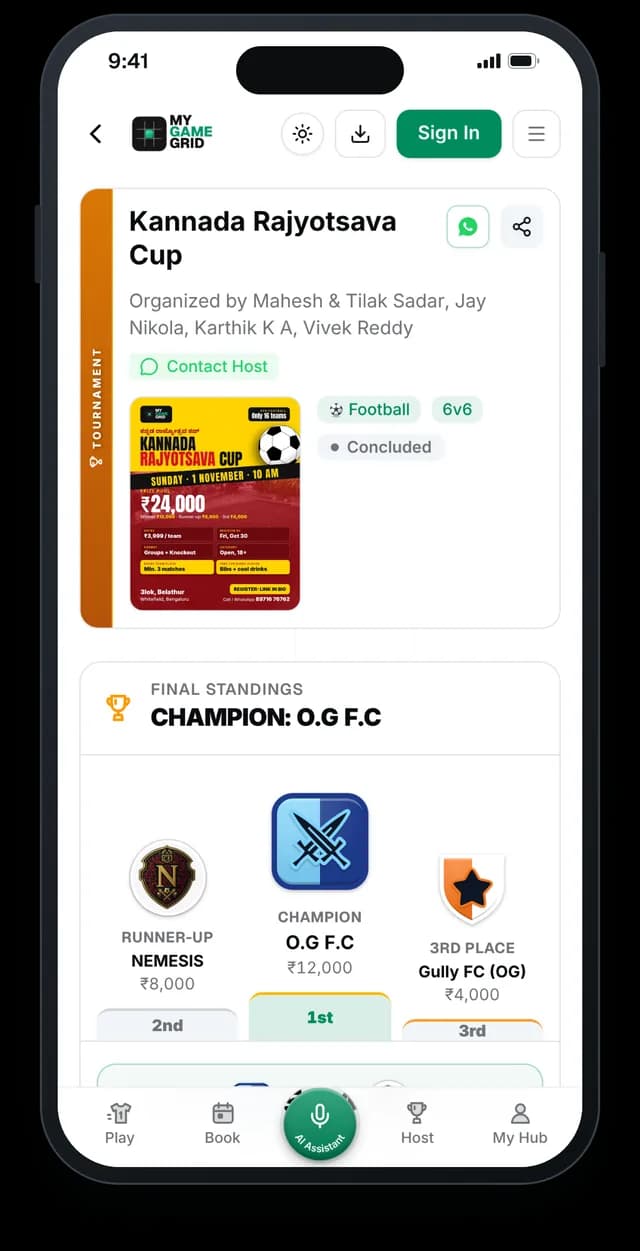
Kannada Rajyotsava Cup
12 teams · 6-a-side football · Sunday 1 Nov 2026 · 3lok Football Fitness Hub, Bengaluru
Registrations, entry fees, groups and knockout, live scores and final standings, all run on MyGameGrid. O.G F.C won the final on penalties.
See the live tournament pageStep 1 of 8 · Format
Pick the right format
The format decides how long your day is and how many games each team gets. Choose it by your number of teams and the hours you have.
What experienced hosts do
- Match the format to your team count. See the table below. Most one-day events with 8 to 16 teams run best as Group + Knockout.
- Give every team at least 2 games. Teams that travel and pay for one 20-minute match rarely come back.
- Check the time first. Example: 1 pitch, 4 hours, 20-minute matches and 5 minutes between them = 9 matches. Plan for 8, because games run late.
- Groups of 3 or 4 work best. Groups of 5 or more take too long, and the last games often do not matter.
| Teams | Best format | Why |
|---|---|---|
| 4 to 6 | League | Everyone plays everyone. 6 teams = 15 matches. |
| 8 to 16 | Group + Knockout | 2 to 3 group games each, then a knockout final. |
| 16+ in one day | Knockout | Fastest: 16 teams = 15 matches. |
| Weekly over weeks | League | Fixed slot every week, table builds up. |
Common mistake
Straight knockout for a small, paid event. Half the teams play only one game and feel they wasted their money.Do it on MyGameGrid
Pick it in one tap
What it saves you: no drawing groups or brackets on paper. Pick the type now. The app makes groups, times and the bracket later, in one tap (step 6).
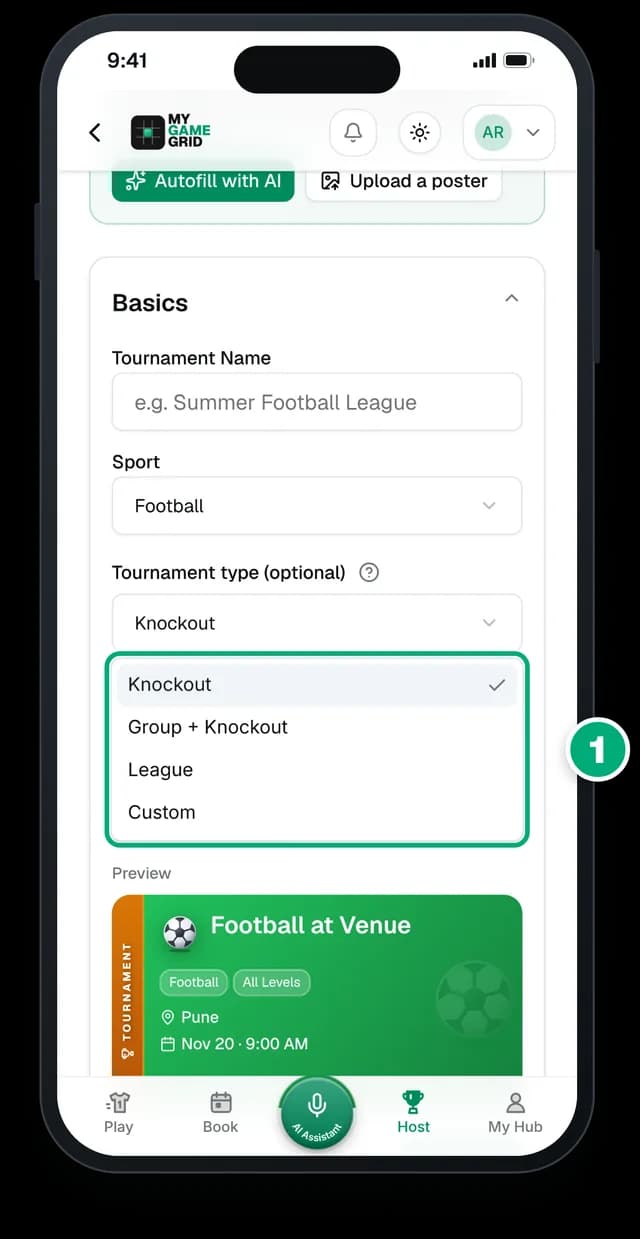
- Open Tournament type and pick Knockout, Group + Knockout, League or Custom.
Not sure? Pick Group + Knockout: it is the fairest for most one-day events.
Running pickleball or badminton doubles? The bonus lesson shows a full doubles event.
Watch the doubles bonus lessonWatch the lesson: Group stage + knockout setupOrganizer Academy Lesson 7Step 2 of 8 · Planning
Plan ahead for match day
Most match day problems start weeks earlier: no deadline, no spare time, no written rules. Fix the date first, then plan each week before it.
What experienced hosts do
- 3 to 4 weeks before: book the venue in writing (pitches, hours, lights, water, washrooms), fix the date, entry fee and prizes.
- 2 weeks before: open registrations and start promoting. Write your rules now, not the night before.
- 3 days before: close registrations. About 1 in 10 teams drop out, so keep a waiting list.
- 2 days before: publish fixtures and times so teams can plan travel and players.
- Match day: arrive 60 minutes early, open check-in 45 minutes before the first match.
Common mistake
No registration deadline. Teams keep saying "will confirm" until the night before, and you cannot make fixtures.Copy this into your rules
Registrations close [date] at 6 PM or when slots are full, whichever comes first.
Do it on MyGameGrid
Dates and deadline in one place
What it saves you: every team sees the dates and deadline on one page. Registration closes on its own when the deadline passes or slots are full.
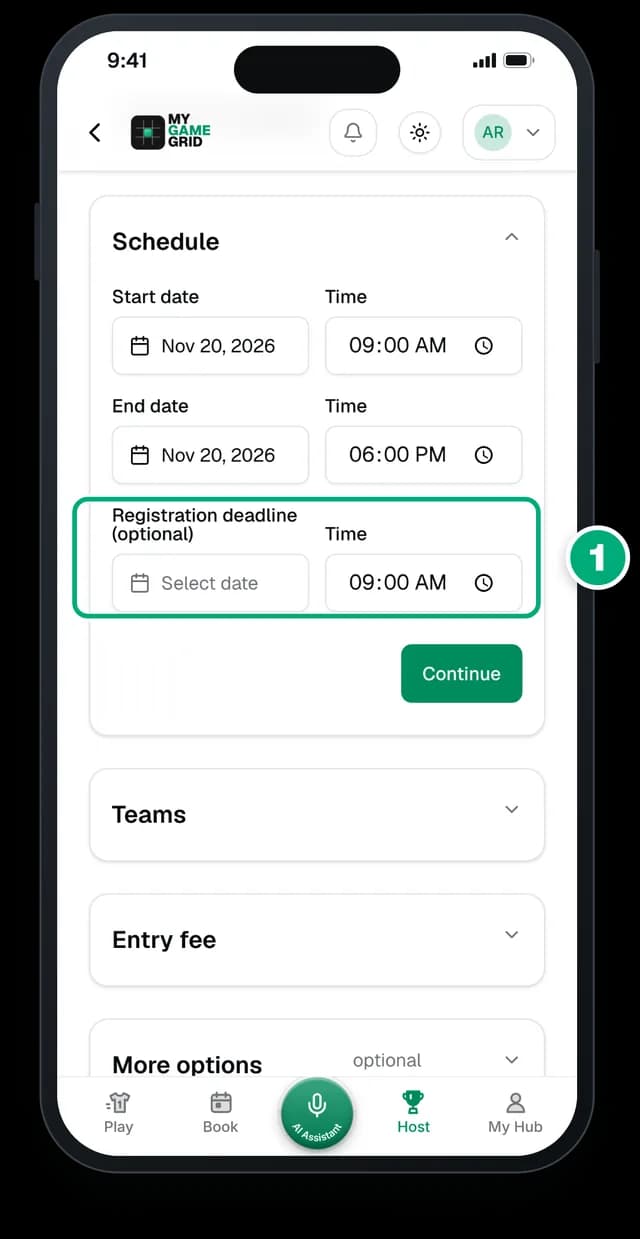
- Set the Start date, End date and a Registration deadline.
Not ready? Save as Draft. A draft is visible only to you, with a Publish now button when you are ready.
Set Max teams under Teams, and the tournament shows "Full" on its own when slots run out.
Watch the lesson: Create your first tournamentOrganizer Academy Lesson 1Step 3 of 8 · Setup
Set it up in 5 minutes
A clear page answers questions before teams ask: sport, format, venue, date, fee, prize and contact. Write it once and share one link everywhere.
What experienced hosts do
- Put the essentials on top: date, start time, venue with a map pin, team size, fee, prize.
- Write the prize in rupees, not "exciting prizes". A real number fills slots faster.
- Add one contact number that someone will actually answer during registrations.
- Use a poster you already have. Teams know it already, and it becomes your cover photo.
Common mistake
Different details in different places: the poster says 9 AM, the WhatsApp message says 10 AM. Keep all details on one page and share that link.Do it on MyGameGrid
Let AI fill the form
What it saves you: no typing the same details again. Paste the WhatsApp message or upload the poster you already made, and the form fills itself.
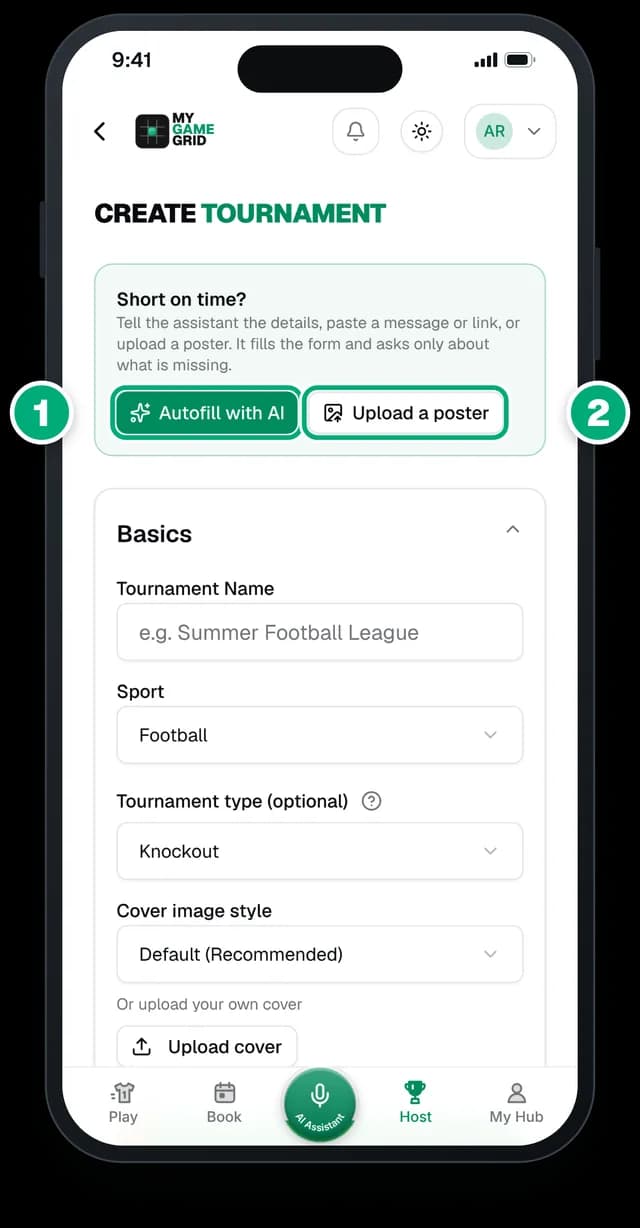
- Tap Autofill with AI, then say or type the details, or paste your WhatsApp message.
- Or tap Upload a poster: it reads the details and uses it as your cover.
The form is six short steps: Basics, Venue & Location, Schedule, Teams, Entry fee, More options.
Always check the dates and venue before you publish. Nothing goes live until you tap Publish.
Watch the lesson: Set up a tournament in 30 seconds with AIOrganizer Academy Lesson 2Step 4 of 8 · Teams
Get teams to register themselves
Collecting names in a WhatsApp chat means retyping every team later. Let captains fill in their own team, once, in one place.
What experienced hosts do
- Share one registration link in every post, status and group, instead of "DM to register".
- Ask only what you need: jersey colour, captain WhatsApp number. Every extra question loses a few teams.
- Post updates as slots fill. "3 slots left" brings in the teams who were waiting.
- Ask other organizers and venues to share your poster. Their followers already play.
Common mistake
Taking registrations by DM and phone at the same time. You end up with two lists and double-booked slots.Copy this into your rules
Registration is only through the link. A slot is held once the captain registers and pays.
Do it on MyGameGrid
Share once, post in seconds
What it saves you: no retyping team lists. Teams register themselves, and ready-made posters announce your event and count down the slots.
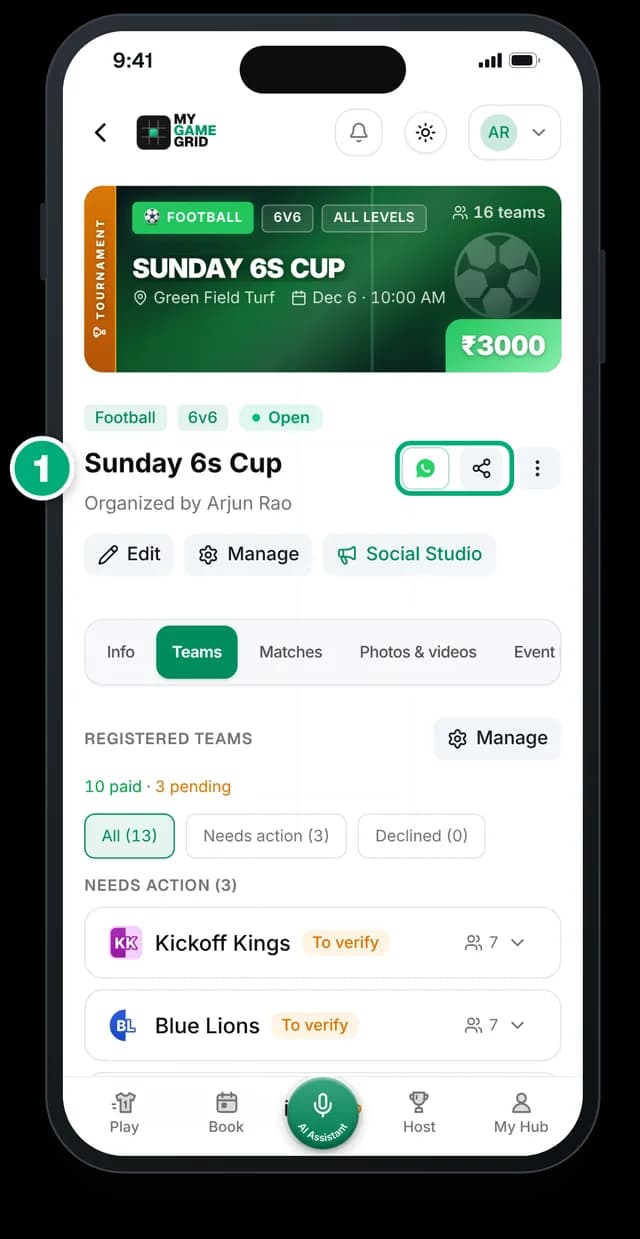
- Share your page on WhatsApp or anywhere else in one tap.
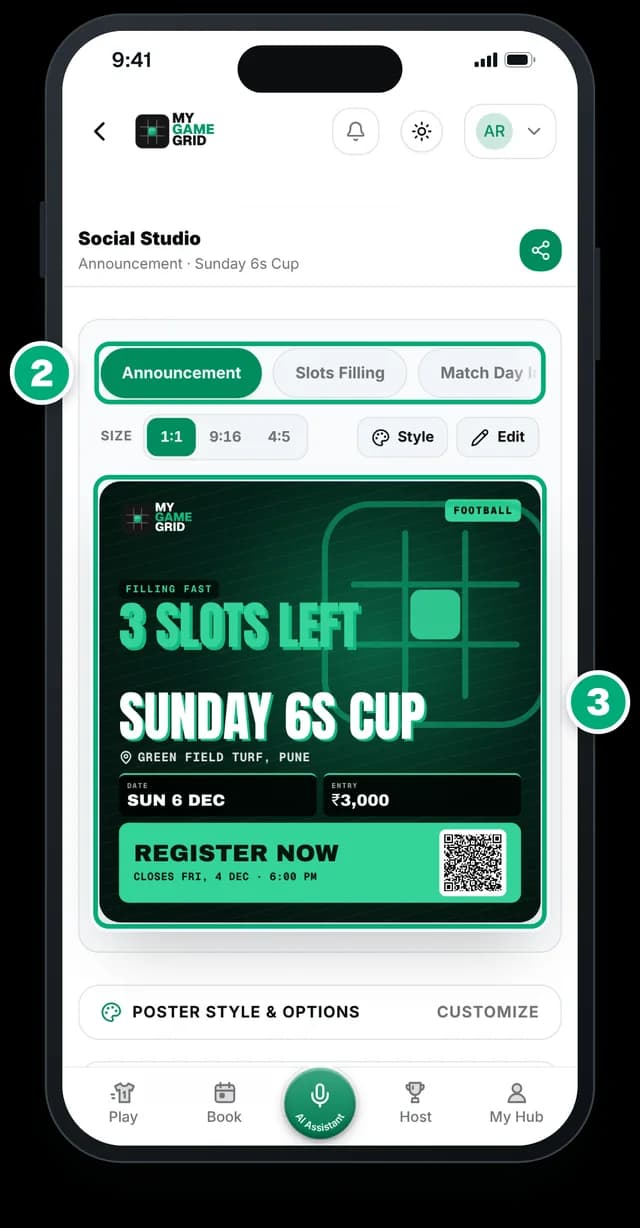
- Social Studio makes posters: Announcement, Slots Filling, Countdown and more.
- Every poster is filled from your details, in 1:1, 4:5 or 9:16, with a caption to copy.
Step 5 of 8 · Money
Collect fees without the chase
Payments take most of a host's time: screenshots in many chats, the bank app open, and a paper list of who paid. These simple rules fix most of it.
What experienced hosts do
- Take an advance to hold a slot. A team that paid Rs 500 comes. A team that only said "confirmed" may not.
- A slot is confirmed when the money arrives, not when someone promises. Put this in your rules from day one.
- Write your refund rule before registration opens. For example: full refund until 3 days before, none once fixtures are out.
- Use one UPI ID for the whole tournament. If you change it halfway, payments get lost.
- Match the 12-digit UPI reference, not the screenshot. Screenshots can be edited. The reference is in your bank app.
Common mistake
Approving a team before the money arrives, then asking for it on match day in front of everyone.Copy this into your rules
A slot is confirmed only after payment. The advance is not refundable once fixtures are published.
Do it on MyGameGrid
Every payment in one list
What it saves you: no screenshots, no paper list. Teams pay you directly by UPI. We take zero commission.
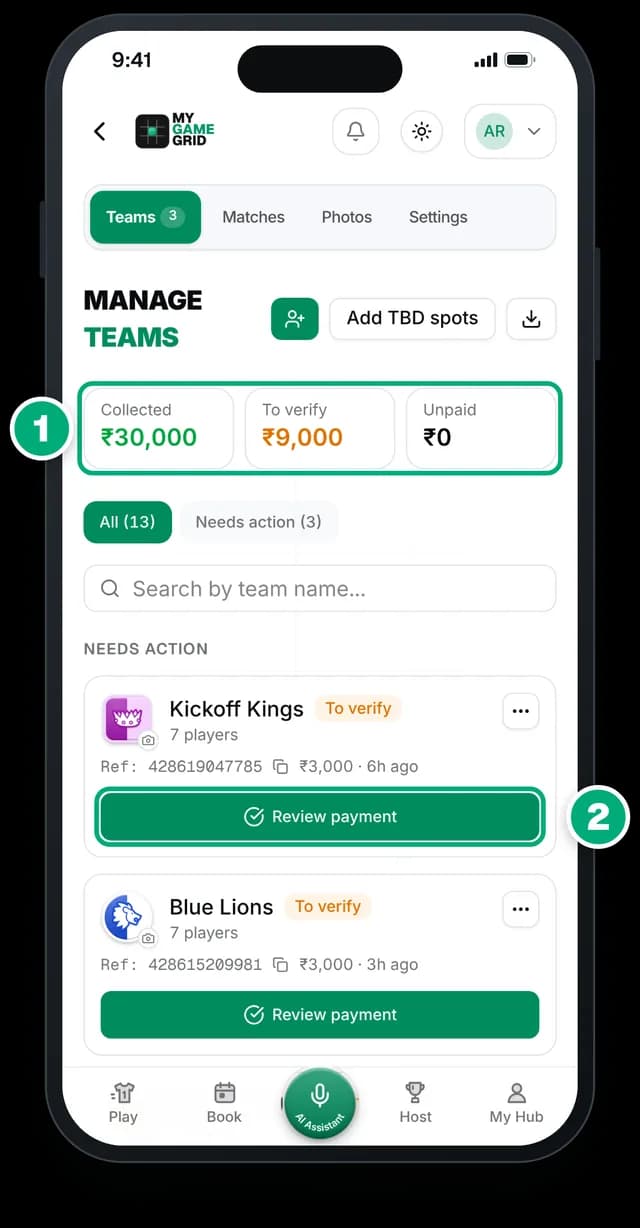
- Collected, To verify, Unpaid: your money at a glance.
- A team pays by UPI and adds its reference. Tap Review payment.
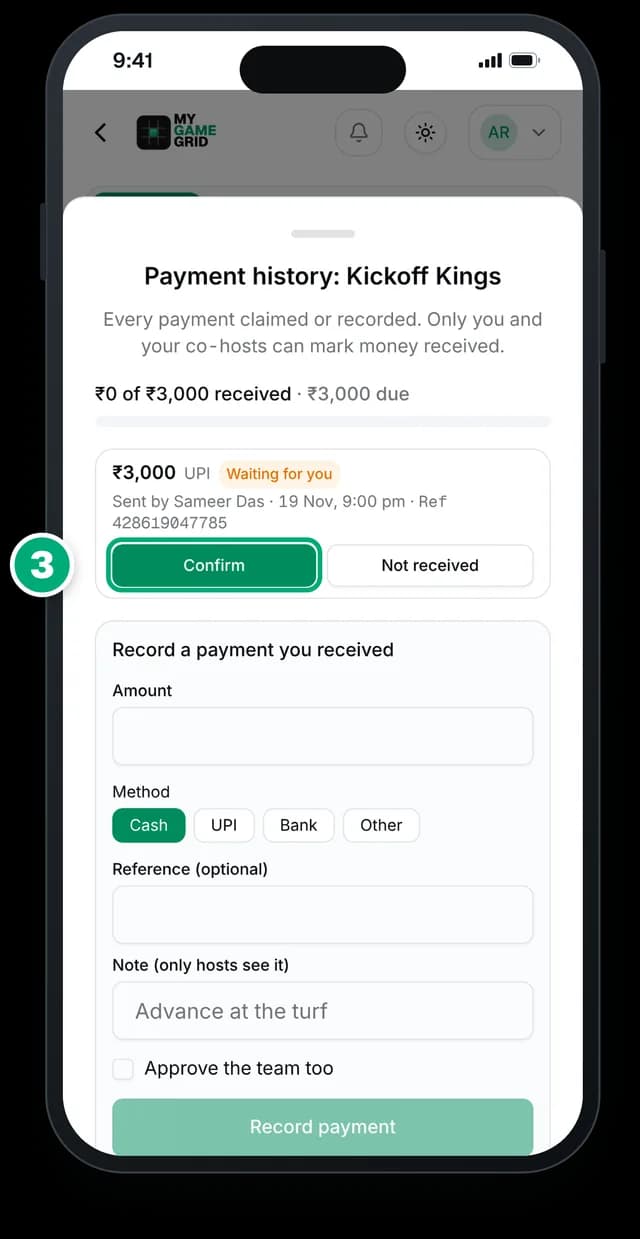
- Match the reference in your UPI app, tap Confirm. Cash at the venue? Use Record payment.
Step 6 of 8 · Fixtures
Fixtures and fair rules
Making fixtures by hand takes an evening, and one dropout breaks them. Clear written rules stop arguments before they start.
What experienced hosts do
- Share tie-break rules before the first match: points, then goal (or point) difference, then goals (or points) scored, then head-to-head.
- Set a late rule: a team more than 5 minutes late loses the match (walkover). Say it in the briefing.
- Plan for no-shows. Decide in advance what happens to their matches and points.
- Never put the same team in back-to-back slots if you can. Give them at least one match of rest.
Common mistake
Changing a rule on the day because one team complains. Everyone else then argues every decision.Copy this into your rules
Ties are decided by goal (or point) difference, then goals (or points) scored, then head-to-head. 5 minutes late = walkover.
Do it on MyGameGrid
Groups, fixtures and times in one tap
What it saves you: no evening spent making groups and times. A team drops out? Run it again. Nothing is public until you publish.
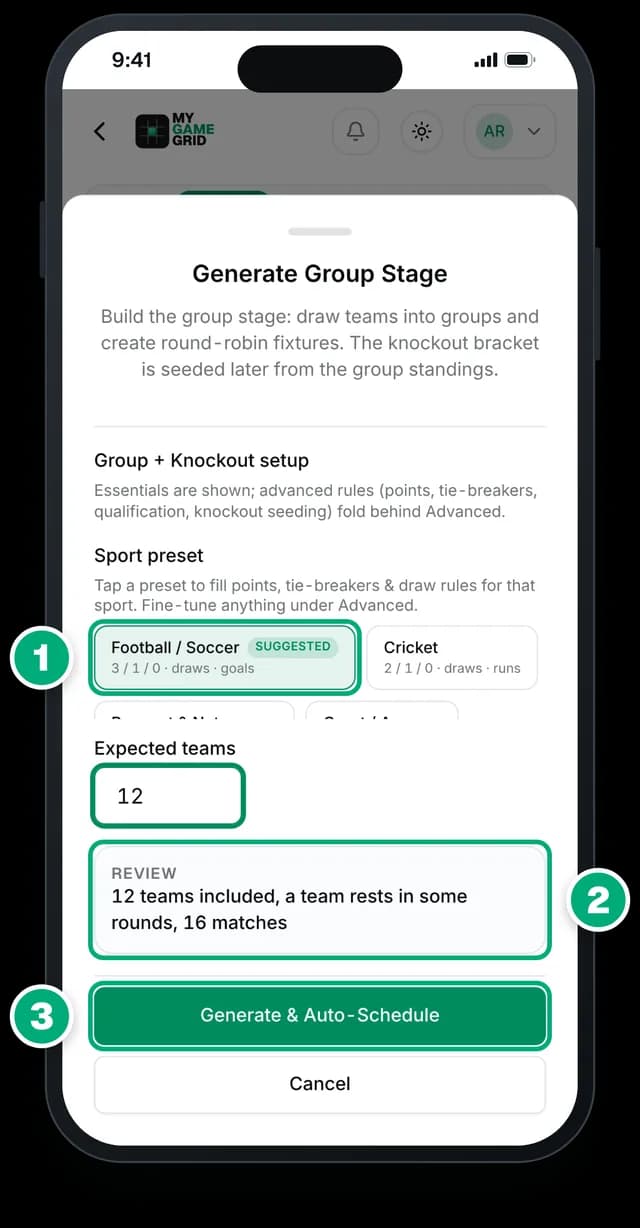
- Tap your sport preset: it fills points and tie-breakers.
- Check the review: teams, matches, open spots.
- Tap Generate & Auto-Schedule.
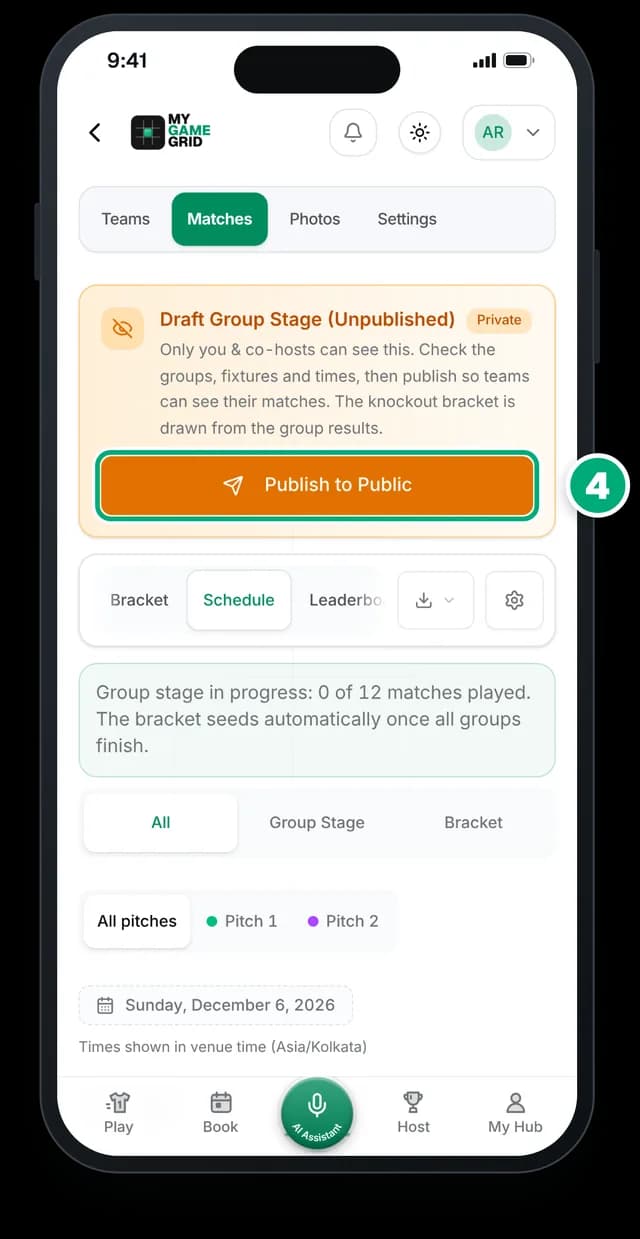
- Check groups and times across your pitches, then Publish to Public.
Step 7 of 8 · Match day
Run match day calmly
Match day is calm when every job has one owner. You should walk the pitches, not answer "what is the score?" all day.
What experienced hosts do
- One person has the final say on disputes, and everyone knows who it is.
- Open a check-in desk 45 minutes early: team present, players listed, balance collected.
- One scorer per pitch, with a charged phone. Enter the result as soon as the match ends.
- Have a 5-minute briefing: rules, late rule, where the schedule is, who to ask.
- Keep basics ready: water, first aid, spare balls, bibs, a power bank.
Common mistake
The organizer is also the only scorer and the only referee. Something always waits, and the day runs an hour late.Do it on MyGameGrid
Live scores from the sideline
What it saves you: no shouting scores across the ground. Every score you log updates the page, the table and the bracket for everyone following.
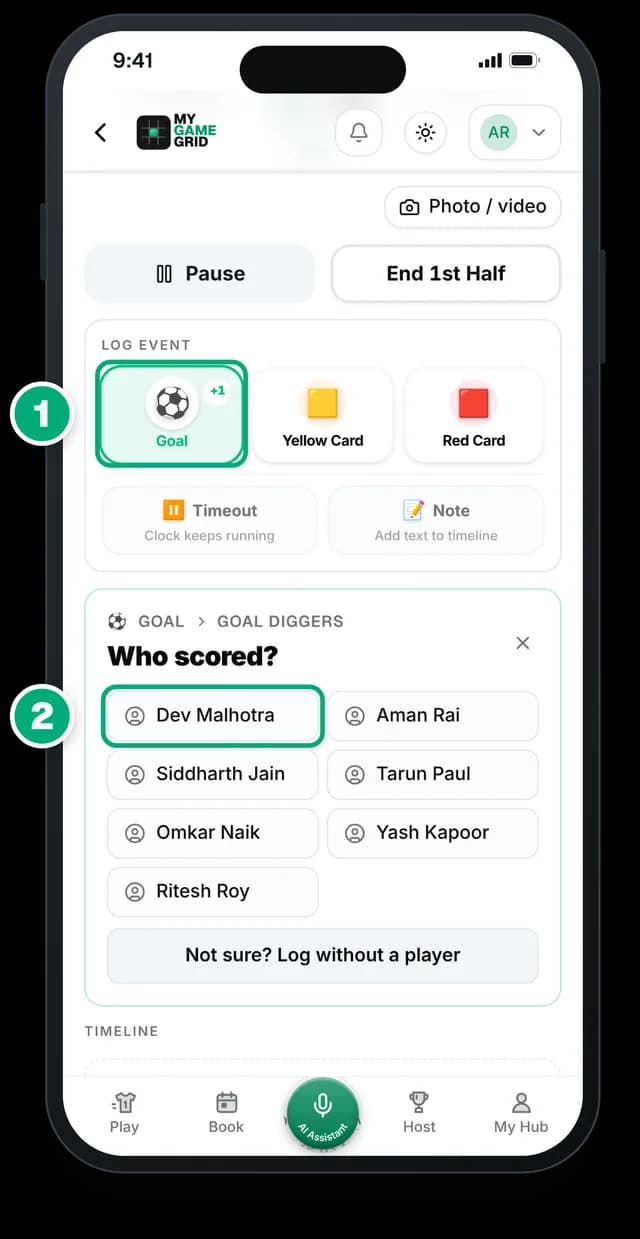
- Tap Goal, then the team.
- Tap who scored, then the assist.
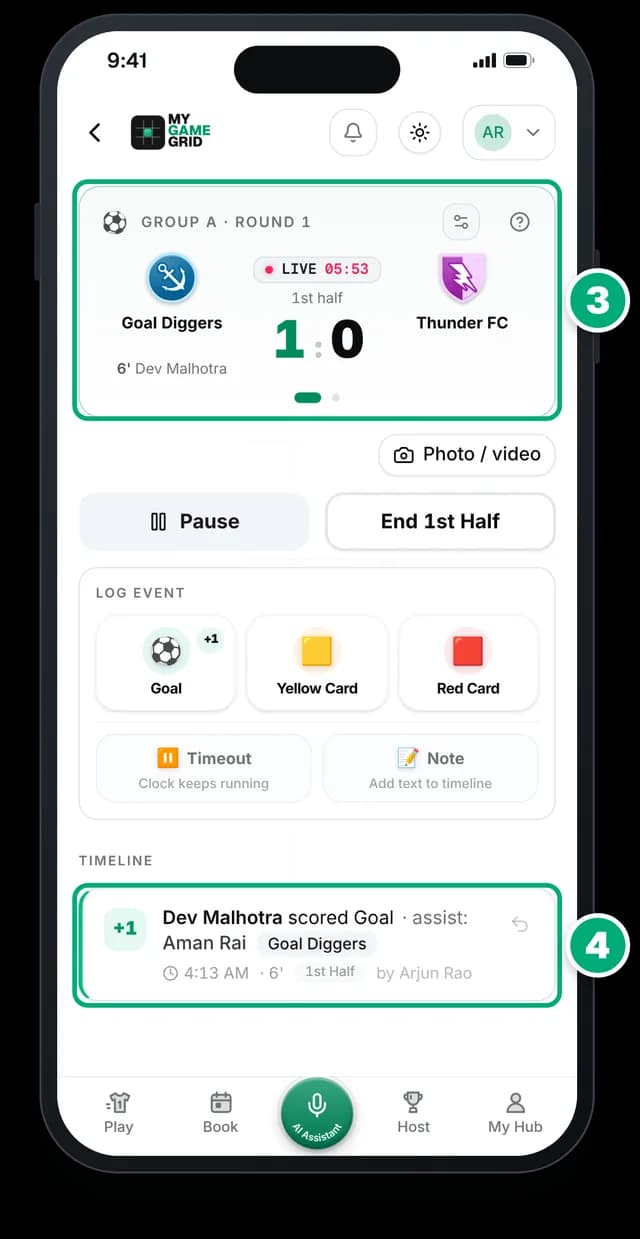
- The score updates live for everyone following.
- Every event is in the timeline, with undo.
Match day kit
Print your event kit
Signs and sheets for the day, filled in from your tournament. Print them or download a PDF. Every QR code opens your live tournament page, so players check times on their phone.
What it saves you: no making signs and schedule printouts by hand the night before.
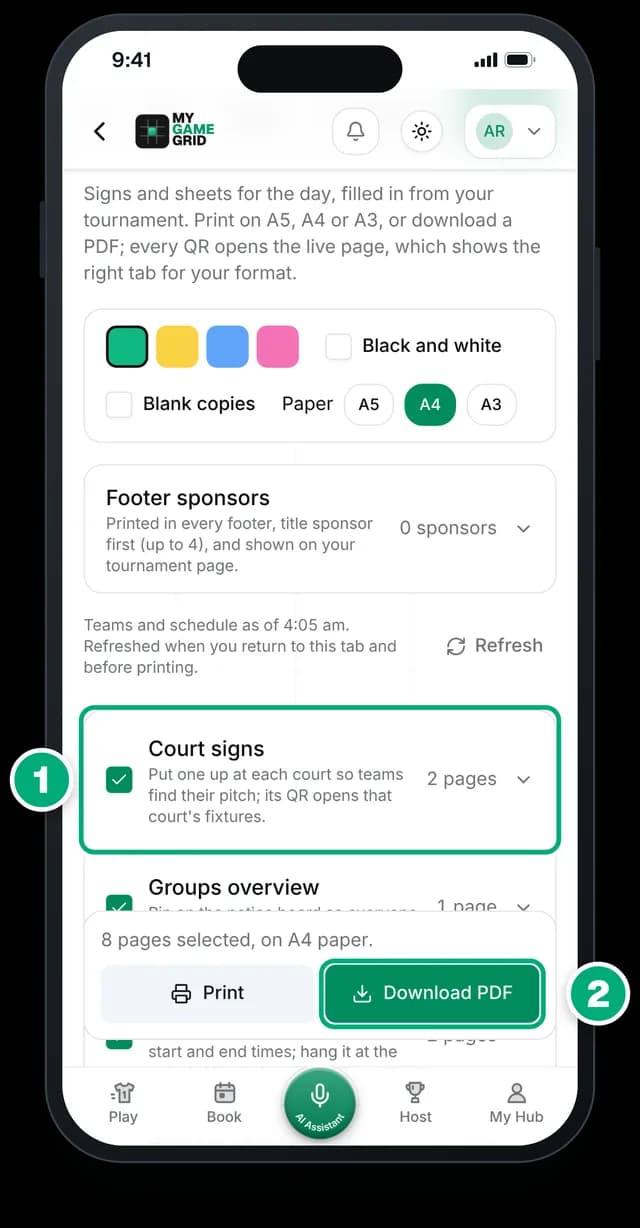
- Court signs for every pitch. Its QR shows that pitch's matches on your live page.
- Download PDF or Print, on A5, A4 or A3.
Also in the kit: Groups overview, Schedule sheets, a Bracket sheet, a Leaderboard poster and a Get the app sheet.
Add up to 4 sponsors and they are printed in every footer.
Step 8 of 8 · After the final
After the final
The hour after the final is the best time to promote. Teams are happy, sponsors want results, and everyone is on their phone.
What experienced hosts do
- Post the champions within the hour, with the team tagged. It is the post teams share most.
- Thank sponsors with real numbers: page visits, posts, teams. It helps you get them again next year.
- Ask for feedback the same evening, three short questions on WhatsApp.
- Announce the next edition while teams are still excited. Give early slots to teams that played.
Common mistake
Posting results two days later. By then nobody shares them.Do it on MyGameGrid
Champions poster in one minute
What it saves you: no designer needed. The poster and caption are filled from your results, ready to post.
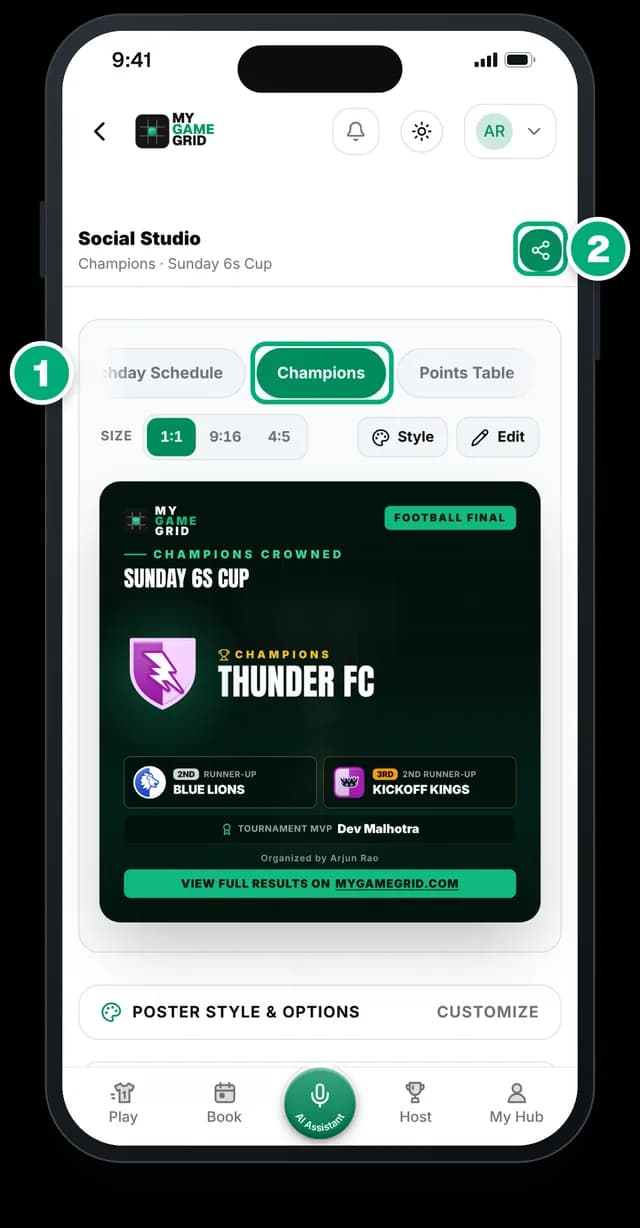
- In Social Studio, pick Champions: winner, runner-up, 3rd and MVP.
- Share or download it with the caption ready to copy.
Also: Points Table and Result posters, a Photos & videos tab for match photos, and sponsor link clicks on your Edit page.
Watch the lesson: After the finalOrganizer Academy Lesson 10Copy and paste
Templates to copy
Fill in the [brackets] and share. Teams that read the rules first argue less, and teams that get every update ask fewer questions.
Your tournament rules
- Format: [Group + Knockout]. [__]-a-side, [__] to [__] players per team. Matches are [__] minutes.
- Entry: Rs [____] per team. A slot is confirmed only after payment.
- Refunds: full refund until [date]. No refund once fixtures are published.
- Reporting time: check in 45 minutes before your first match. 5 minutes late = walkover.
- Points: win 3, draw 1, loss 0. Ties: goal (or point) difference, then goals (or points) scored, then head-to-head.
- Knockouts: a draw goes to [penalties / extra time].
- Players: only registered players can play. One team per player.
- Conduct: abuse of referees or players means removal, with no refund.
- Final say: the tournament director's decision on the day is final.
WhatsApp messages, from launch to after the final
Send them in this order to your teams group. T-3 means 3 days before match day, and T-0 is match day.
- T-14
Registrations open
2 weeks before match day
🏆 [Tournament name] registrations are open! 🏅 [Sport] · [__]-a-side · [Format] 📅 [Day, date] · first match at [time] 📍 [Venue, area, city] 💰 Entry Rs [____] per team 🎁 Prize Rs [____] 👥 Only [__] team slots Register your team here: [your MyGameGrid link] Your slot is confirmed after payment. Registration closes on [date] at [time]. Questions? Call [name] on [number].
- T-7
Slots filling
1 week before, or when most slots are taken
⚠️ Only [3] slots left for [Tournament name]! [__] teams have already registered. 📅 [Day, date] · 📍 [Venue] Register before [date]: [link]
- T-3
Last day to register
3 days before match day
⏰ Last day to register for [Tournament name]! Registration closes today at [time]. Only [__] slots left. Register here: [link]
- Any day
Payment reminder
To one captain who has not paid yet
Hi [captain name], thank you for registering [team name] for [Tournament name]. Your payment of Rs [____] is still pending. Please pay by [date] to confirm your slot, then add your UPI reference on the tournament page: [link] After [date], the slot goes to the next team on the waiting list.
- T-2
Fixtures are out
2 days before, once registration closes
📋 Registration is closed. Fixtures are out for [Tournament name]! ✅ [__] teams are confirmed. See your group, match times and pitch here: [link] ⏰ Please come 45 minutes before your first match. ⚠️ More than 5 minutes late = walkover. Please share this with all your players.
- T-1
See you tomorrow
1 day before match day
🏆 See you tomorrow at [Tournament name]! 📍 [Venue]: [map link] ⏰ Check-in opens at [time]. Come 45 minutes before your first match. 👕 Bring your [team colour] jersey, shoes, water and ID. 💰 Balance to pay? Please pay Rs [____] at check-in. Your matches and live scores: [link]
- T-0
Match day
Match day morning, 2 hours before
☀️ Match day! [Tournament name] starts at [time] today. Check-in is open at [venue] from [time]. Family and friends can follow live scores here: [link] Good luck to all teams! 🙌
- T-0
Knockouts are set
Match day, when the groups end
🔥 The group stage is over. The knockouts are set! See who plays who: [link] First knockout match: [time] on [pitch or court]. Teams in the knockouts, please stay near your pitch.
- T-0
Champions and thanks
Match day evening, after the final
🏆 Congratulations [champion team], champions of [Tournament name]! 🥈 Runners-up: [team] 🥉 Third place: [team] ⭐ Best player: [name] Thank you to all [__] teams, our referees and our sponsor [sponsor name]. Full results and photos: [link] Please help us improve. Reply with: 1. What did you like? 2. What should we change? 3. Will you play the next one?
- T+7
Next edition
1 week after match day
📣 [Tournament name] is back on [day, date]! Teams that played last time get the first slots until [date]. Entry Rs [____] per team. Register here: [link]
Paste the first message into Autofill with AI to fill your tournament form. For posters, use Social Studio: its Slots Filling template counts the slots for you.
Match day run sheet
| When | What | Who |
|---|---|---|
| 60 min before | Arrive. Check pitches, lights, goals, water, first aid | [__] |
| 50 min before | Put up court signs and schedule sheets (Event kit) | [__] |
| 45 min before | Open check-in: teams present, players listed, balances paid | [__] |
| 15 min before | Captains' briefing: rules, late rule, who decides | [__] |
| Kick-off | First match. One scorer per pitch logs live | [__] |
| Every hour | Check delays, move matches if a pitch runs late | [__] |
| Groups end | Check standings, announce knockouts | [__] |
| Final | Awards, team photo, champions poster within the hour | [__] |
| Same evening | Thank teams and sponsors, ask for feedback | [__] |
Bring: Spare balls, bibs, pump, whistle, first aid kit, water, power bank, printed schedule, a pen.
Need a hand?
We will set up your first tournament with you
Send us your poster or WhatsApp message. Our team sets it up with you, and we promote it free on our Instagram, Facebook and Threads. Free to host, zero commission on entry fees, any sport.