Reviewed by Turf & Community Captains
Format, court maths, entry fees and UPI collection: a step-by-step plan for running your first pickleball doubles tournament in India.
To organise a pickleball tournament in India, fix four things first: the format, the number of courts, the entry fee and how you collect it. Everything else (fixtures, scoring, prizes) follows from those four. This guide walks through each step with real numbers, so your first event runs on time.
Pickleball is the fastest growing racquet sport in the country. India went from about 200 courts in early 2024 to more than 1,200 by March 2025, according to Finshots. New players want to compete, and most cities still have only a handful of well-run tournaments. That gap is your opportunity.
1. Pick a Format That Fits Your Courts
The best format for a first pickleball tournament is a group stage followed by a knockout. Every team gets at least three matches, and the knockout gives you a clear champion by the end of the day.
The common options:
- Knockout (single elimination): lose once and you are out. Fast, but half the field plays only one match. Fine for 8 teams and a short window.
- Group + Knockout: teams play everyone in their group, then the top two from each group go into a knockout bracket. This is the format most amateur events use, and players get value for their entry fee.
- Round robin only: everyone plays everyone. Good for 4 to 6 teams or a social evening, but it gets long fast. Eight teams means 28 matches.
Run doubles unless you have a reason not to. Most recreational players in India play doubles, and you need half as many courts per player.
2. Check the Pickleball Court Size and Setup
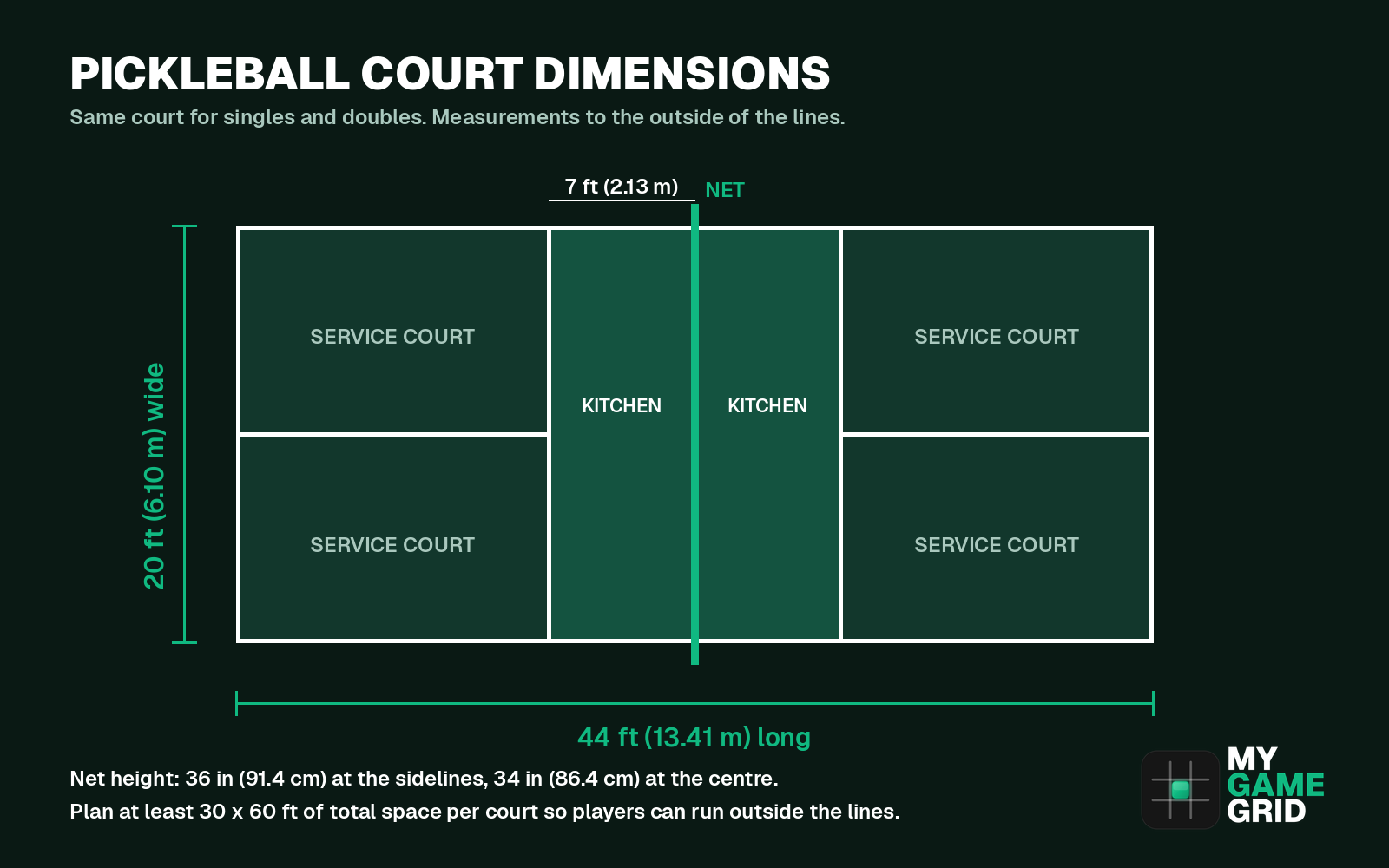
A standard pickleball court is 20 feet wide and 44 feet long (6.10 m by 13.41 m), the same size for singles and doubles. Check every court at your venue against these numbers before you book, because converted badminton or tennis courts are not always marked correctly.
What to check on each court:
- Lines: the non-volley zone (the "kitchen") runs 7 feet from the net on both sides. Service courts are split by a centre line.
- Net: 36 inches (91.4 cm) high at the sidelines and 34 inches (86.4 cm) at the centre. Measure it, because portable nets sag.
- Run-off space: plan for at least 30 by 60 feet per court in total so players can chase wide balls without hitting a wall or the next court.
- Lighting and surface: for evening sessions, walk the court under the lights before the event. Look for glare and slippery patches.
3. Do the Court Maths Before You Book
Plan around 20 minutes per match when games go to 11 points. A match is one game to 11, win by 2, in most amateur group stages. Knockout rounds can move to best of three if you have time.
Here is a worked example for 16 doubles teams on 4 courts:
- Four groups of four teams. Each group plays 6 matches, so the group stage is 24 matches.
- The top two from each group make 8 quarter-finalists. Quarter-finals, semi-finals, final and a 3rd-place match add 8 more.
- That is 32 matches in total. On 4 courts, that is 8 rounds of play.
- At 20 minutes a round, play takes about 2 hours 40 minutes. Add 15 minutes between stages and a warm-up slot, and book the venue for 4 hours.
Always add buffer time. Close games run long, and someone always arrives late.
If you only have 2 courts, cap the event at 8 teams or split it across two sessions (groups in the morning, knockouts in the evening).
4. Set Categories and Entry Rules
Clear categories stop arguments on the day. Decide these before you announce:
- Categories: men's doubles, women's doubles, mixed doubles. For a first event, one or two categories are plenty.
- Skill level: beginner, intermediate or open. Ask teams to self-declare, and say clearly that you can move a team up if they are obviously stronger.
- Age groups: optional. A 40+ category gives older players a fair draw and can bring in a different crowd.
- Equipment: state the ball you will use (outdoor or indoor) and whether players bring their own paddles.
- Rules: say you follow the official rulebook, for example the USA Pickleball rules, and list any local changes such as rally scoring or time caps.
- Pickleball scoring: in doubles, most amateur events use traditional side-out scoring, where only the serving team can win a point and the score is called as three numbers (your score, their score, server 1 or 2). Games go to 11 and must be won by 2. Some events switch to rally scoring to keep the schedule tight. Pick one and print it on the rules sheet.
5. Price the Entry Fee and Collect It on UPI
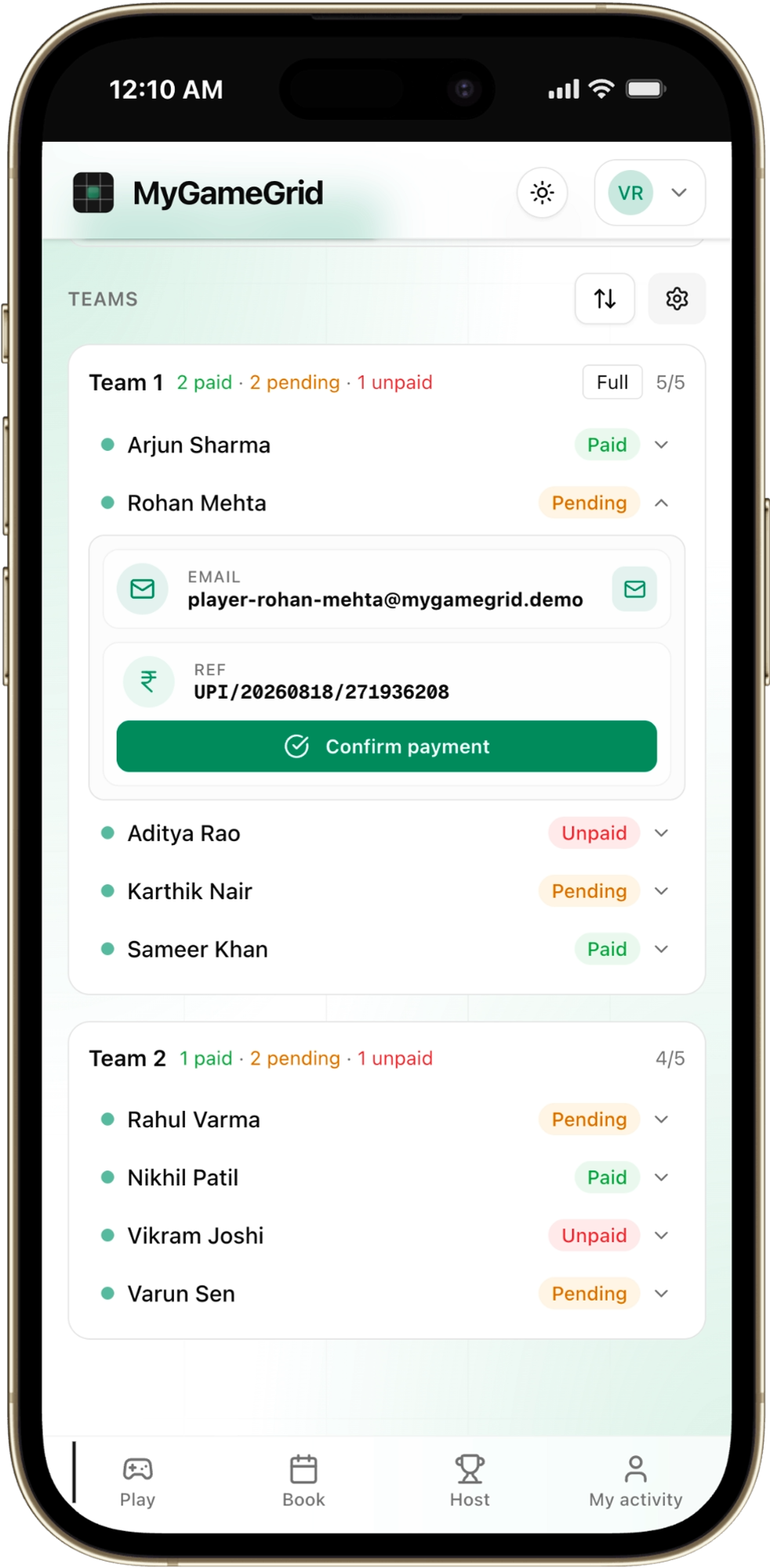
MyGameGrid host view showing each player's UPI payment as paid, pending or unpaid, with a Confirm payment button next to the UPI reference
Price the entry fee from your costs, not from what other events charge. Add up court hire for the full booking, balls, a scorer or referee, prizes and a small buffer, then divide by the number of teams.
Example: 4 courts for 4 hours, plus balls, medals and a trophy. If the total is ₹24,000 and you expect 16 teams, ₹1,500 per team breaks even. Charge a little more if you want a prize pool.
Collecting money is where most first-time organizers lose control. A WhatsApp group full of payment screenshots is hard to check, and you end up with teams that "paid" but never sent a reference.
A better setup:
- Teams register on a form that records the captain, the team name and the players.
- The form shows your UPI ID and a QR code with the exact amount.
- The captain pastes the UPI transaction ID after paying.
- You confirm each payment against your bank app before the team counts as entered.
On MyGameGrid, this is how paid tournaments work by default. A paid event uses approval mode, so no team is confirmed until you check its payment. Players pay you directly by UPI, and MyGameGrid does not take a cut of the entry fee. You see paid, pending and unpaid teams in one list.
6. Generate Fixtures and Share One Live Link
Do not build the fixture list by hand in a spreadsheet (our guide on how to host a match explains why live scorecards beat paper). It takes hours, and one late withdrawal means starting again.
Once registration closes, a fixture generator should do three jobs:
- Draw teams into groups (balanced by seed or random).
- Schedule matches across your courts with a start time for each.
- Seed the knockout bracket from the group standings when the groups finish.
MyGameGrid does this with its Group + Knockout format and a Racquet & Net preset built for sports like pickleball: 2 points for a win, no draws, and ties broken by head-to-head. You share one tournament link. Players see their court and time, and the standings update as scores come in. Running a football event too? Our 5-a-side tournament checklist covers the same planning for turf football.
7. Run the Day
The day goes smoothly when every court has a scorer and every team knows where to look.
- Check-in desk: open 45 minutes before the first match. Confirm every player and hand out the schedule link.
- One scorer per court: a volunteer or the losing team of the previous match. Scores go in right after each match, not in one batch after the final.
- Live scores: post the live standings on a screen or share the link in your WhatsApp group so teams stop asking "who do we play next?".
- Time keeping: call the next match 5 minutes before it starts. If a team is 10 minutes late, award a walkover. Say this rule in advance.
- Prizes: run the final and the presentation while the venue is still full. Photos of the winners are your best marketing for the next event.
8. Let a Voice Assistant Do the Admin
Most organizers run tournaments around a day job, so admin happens on the phone at night. MyGameGrid has a voice assistant called Sara that can set up the tournament for you. Say something like "Pickleball doubles, group and knockout, 16 teams, Sunday 7 am at our club, ₹1,500 entry", or upload your poster, and Sara fills in the create form. You check the details and publish.
Frequently Asked Questions
How many courts do I need for a pickleball tournament?
For 16 doubles teams in a group and knockout format, 4 courts let you finish in about 4 hours including buffer. With 2 courts, plan for 8 teams or a full day. Each court handles about 3 matches an hour when games go to 11.
What is a fair entry fee for a pickleball tournament in India?
Work it out from your costs: court hire, balls, prizes and staff, divided by the number of teams, plus a margin if you want a prize pool. Your venue cost is the biggest factor, so get a quote before you set the fee.
What size is a pickleball court?
A pickleball court is 20 feet wide and 44 feet long, with a 7-foot non-volley zone on each side of the net. Allow at least 30 by 60 feet of total space per court for run-off.
Do I need sanction from a pickleball association?
Not for a club or community event. Sanctioning matters only if you want ranking points or an official ranked event. Contact your state association if you want that.
Can I run a pickleball tournament without an app?
Yes, with a sheet and a lot of WhatsApp messages. An app saves you the payment checks, the fixture maths and the "who's next" questions on the day.
Host Your First Pickleball Tournament
Pick group and knockout, do the court maths, collect fees on UPI with a transaction ID and share one live link. That covers most of what goes wrong at first events. When you are ready, create your tournament on MyGameGrid for free and let teams register and pay from one link.
Host Your Own Tournament
Set up custom knockout brackets, manage team registrations, and log live match scores with MyGameGrid.
More from GameFeed
Guides and stories to level up your game.

How to Join a Pickup Football Game in Bangalore (Without Knowing Anyone)
Want to play football in Bangalore but do not have a team? Here is exactly how to find and join pickup football games near you — no squad needed, no experience required.

Pickleball vs Padel: Which Courts to Build
Pickleball vs padel for venue owners: compare court size, build cost in India, earnings and which courts to build first, with diagrams drawn to scale.

Pickleball Court Size and Dimensions Guide
Pickleball court size is 20 by 44 feet, but venues need 30 by 60 feet per court. See every dimension, how many courts fit in your space and a setup checklist.